- The Gen Creative
- Posts
- Apple Is Teaching AI To Edit Photos The Way Humans Do
Apple Is Teaching AI To Edit Photos The Way Humans Do
+ Photoshop and Premiere Pro’s New AI Tools Can Instantly Edit More of Your Work


Eric Verdeyen & Maddy Wong
November 04, 2025
The Gen Creative
Today’s Creative Spark…
Apple Is Teaching AI To Edit Photos The Way Humans Do
Photoshop and Premiere Pro’s New AI Tools Can Instantly Edit More of Your Work
Adobe Just Previewed Some of the Wildest AI Tools We’ve Ever Seen
Figma’s New App Lets You Combine Multiple AI Models and Editing Tools
Zoner Studio Improves Everyday Photo Editing with Enhanced AI Tools in This Fall's Update
AI is quietly taking care of the behind-the-scenes work, sorting images, leveling sound, and polishing text, so creators can focus on the bigger picture and let their ideas shine.
Read time: 9 minutes
Photography

Source: BGR
Summary: Apple has unveiled a new research paper titled Pico-Banana-400K, detailing how its AI is being trained to perform photo edits in a human-like way. Using 400,000 examples of text-guided image editing, Apple combined multiple models—Nano-Banana for edits, Gemini-2.5-Flash for generating instructions, and Gemini-2.5-Pro for judging results—to improve how AI interprets and applies creative adjustments. The study explores 35 types of edits, from color changes to object additions, finding that stylistic edits are the most successful so far. These findings could power future Apple Intelligence features, potentially allowing users to instruct Siri to crop photos, adjust lighting, or modify styles naturally.
Five Essential Elements:
New Dataset: Pico-Banana-400K includes 400,000 text-guided image edits for AI training.
Multi-Model Collaboration: Uses Nano-Banana, Gemini-2.5-Flash, and Gemini-2.5-Pro models for editing and evaluation.
Human-Like Edits: Focuses on realistic, intuitive adjustments similar to manual editing.
Future Integration: Insights could enhance Apple Intelligence and Siri’s photo editing capabilities.
AI Precision Benchmark: May serve as a new standard for evaluating text-to-edit performance across models.
Published: October 30, 2025
Photography & Video

Source: Adobe
Summary: At Adobe Max 2025, Adobe introduced major AI updates for Photoshop, Premiere Pro, and Lightroom, designed to automate repetitive editing tasks and expand creative possibilities. Photoshop’s Generative Fill now supports third-party AI models from Google and Black Forest Labs, giving users a wider range of visual results when adding or replacing image elements. A new AI Assistant, currently in beta, lets users perform complex edits through simple text prompts like “increase saturation.” Lightroom’s Assisted Culling helps photographers quickly find the best shots from large batches, while Adobe Firefly Image 5 improves realism, resolution, and context-aware editing. For video creators, Premiere Pro’s AI Object Mask can automatically detect and isolate people or objects, simplifying color grading and visual effects work.
Five Essential Elements:
Expanded AI Models: Photoshop’s Generative Fill now integrates Google and Black Forest Labs’ models alongside Adobe Firefly.
AI Assistant: Photoshop introduces a chat-style editor that executes natural-language editing commands.
Enhanced Lightroom Workflow: Assisted Culling automatically identifies top-quality photos based on focus and composition.
Firefly Image 5: Upgraded to generate native 4MP images with improved realism and precise prompt-based edits.
AI Object Mask for Premiere Pro: Automatically detects and isolates subjects in video for faster, cleaner edits.
Published: October 28, 2025
Workflow by The Gen Creative
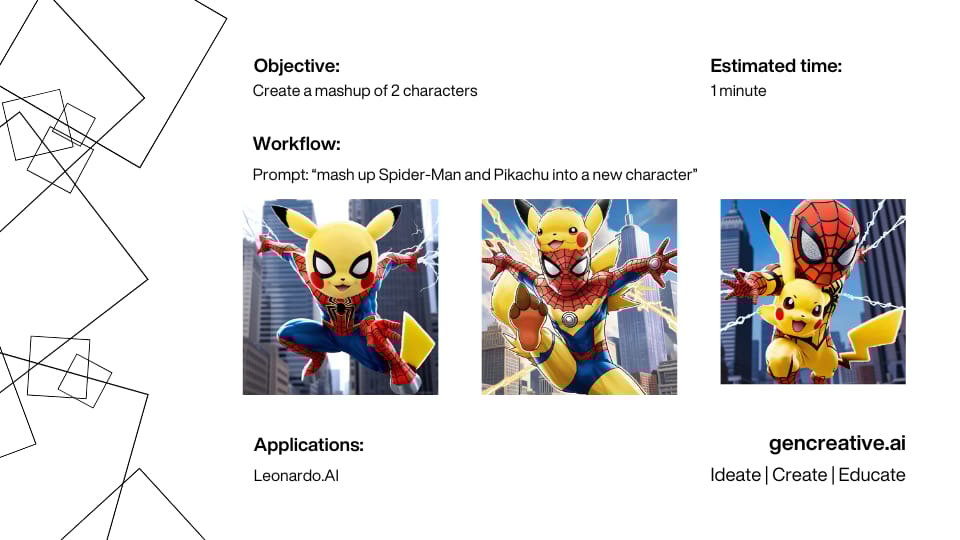
In each newsletter, the Gen Creative team puts together a practical creative workflow so you can get ideas of how to implement AI right away. Want to see more? Check them out here!
Creativity

Source: Adobe
Summary: At Adobe Max 2025, Adobe unveiled a series of experimental AI tools that could redefine creative workflows across design, photo, and video production. The company showcased more than ten prototypes during its annual “Sneaks” session, offering a glimpse into the future of AI-assisted creativity. Highlights included Project Motion Map, which animates static Illustrator images using text prompts; Project Clean Take, an AI audio editor that can modify speech and background sounds; Project Light Touch, which adjusts lighting and shadows within photos after they’re taken; and Project Frame Forward, which allows users to edit entire videos simply by adjusting a single frame. These innovations point toward a new era of design tools where creators can direct, rather than manually execute, their creative visions.
Five Essential Elements:
Project Motion Map: Brings still Illustrator images to life through text-based animation prompts.
Project Clean Take: Enables precise speech and background audio edits directly from a transcript.
Project Light Touch: Lets users relight photos in post-production with AI-controlled illumination.
Project Frame Forward: Applies edits made to one video frame across the entire sequence automatically.
AI Research Focus: Demonstrates Adobe’s commitment to blending human creativity with intelligent automation.
Published: October 30, 2025
Design

Source: Figma / Weavy
Summary: Figma has launched Figma Weave, a powerful new platform built from its acquisition of Weavy — a creative tool that lets users connect multiple AI models and editing apps into one interactive workspace. Weave uses a node-based canvas, allowing designers to visually map out creative workflows, chain together image or video edits, and even compare results from different AI models at once. Instead of working inside one AI tool at a time, creators can now orchestrate complex, multi-step edits without switching between apps.
Five Essential Elements:
Node-Based Design: Visual, mind-map-style interface to connect tools and AI models.
Multi-Model Support: Run the same prompt through multiple AI systems simultaneously.
Integrated Workflow: Combine image and video editing steps within one environment.
Acquisition Roots: Built from Figma’s purchase of Weavy, now rebranded as Figma Weave.
Creative Vision: Empowers designers to go “beyond the prompt” and refine AI outputs with human craftsmanship.
Published: October 30, 2025
Photography

Source: Zoner Studio
Summary: Zoner Studio’s latest Fall Update makes photo editing faster and smarter for everyday photographers. The update introduces AI Close-ups for rapid subject detection — now recognizing people, animals, and even vehicles — and AI Resize, which lets users enlarge photos without losing quality. These tools help streamline the editing process while maintaining realistic, high-quality results. With performance improvements and a smoother interface, Zoner Studio continues to offer an intuitive, affordable option for photographers of all skill levels.
Five Essential Elements:
AI Close-ups: Automatically identifies key subjects like faces, figures, and animals for faster photo selection.
AI Resize: Enlarges photos while preserving sharpness and detail.
Offline Processing: All AI features work locally for speed and privacy.
Streamlined Workflow: Improved interface for faster, more intuitive editing and exporting.
Accessible Design: Balances powerful tools with simplicity for both beginners and pros.
Published: October 30, 2025
Remote Creative Jobs
5 Remote Startup Creative Jobs
Brand Designer: Design visual identities and guide brand systems for global digital products at MetaLab (remote, PST–BRT).
Digital Designer: Create Arabic + English motion content for Crypto.com MENA.
Unreal Artist: Create real-time architectural experiences in Unreal Engine for Soluis.
Writer / Editor: Write and edit B2B tech content for LaunchSquad, turning complex ideas into engaging stories.
Multimedia Designer: Create ads that sell with video, motion, and sound at AlgaeCal.
See you next time!
When you’re creating, some work is big and visible, some is quiet and behind the scenes. 🖥️🎨 AI is starting to handle the behind-the-scenes bits—sorting images, leveling sound, polishing words. 🖼️🎚️✍️ It’s not front and center, just part of the flow. 📸🎤📑
How did you like it?
We'd love to hear your thoughts on today’s Creative Spark! ✨ Your feedback helps us improve and tailor future newsletters to your interests. 📝 Please take a moment to share your thoughts and let us know what you enjoyed or what we can do better. 💬 Thank you for being a valued reader! 🌟
Keep Reading
AI is reshaping photo editing by making complex adjustments simple and fast. Tools like Luminar Neo use features such as GenErase, GenSwap, and GenExpand to automate object removal and scene enhancement. Fotor offers beginner-friendly editing with automatic corrections, filters, and batch processing through a low-cost cloud-based platform. Adobe Photoshop integrates Firefly 3 for generative fill and expand, bringing advanced AI to professional workflows. Canva Visual Suite 2.0 focuses on accessibility, combining tools like Magic Eraser, Magic Edit, and background generation with design templates for social media users. Topaz Photo AI prioritizes image quality through Denoise, Sharpen, and Recover Faces, catering to photographers seeking clarity and precision over creative effects. Each platform shows how AI can now handle everything from casual touch-ups to professional-grade enhancements with ease.
Samsung’s upcoming One UI 8.5 update combines its Object Eraser and Generative Edit tools into a single, AI-driven photo editor that removes, repairs, and fills backgrounds seamlessly. Beyond photo editing, the update integrates broader Galaxy AI features like Touch Assistant for document summaries, Smart Clipboard for contextual text actions, Meeting Assist for live translations, and Social Composer for AI-generated captions. It also introduces privacy-focused tools that automatically detect and blur sensitive information in photos before sharing. Designed for efficiency, on-device processing speeds up edits while keeping user data private. Launching alongside the Galaxy S26 in early 2026, One UI 8.5 positions AI as a natural, intuitive layer of the Samsung experience rather than a standalone add-on.
AI-generated videos are increasingly difficult to distinguish from reality, especially with OpenAI’s Sora app, which allows users to create lifelike clips with synchronized audio and realistic visuals. The app’s viral “cameo” feature lets users insert real people into synthetic scenes, heightening concerns about deepfakes and misinformation. To verify authenticity, viewers can look for Sora’s bouncing cloud watermark, though it can be removed, or check a video’s metadata through the Content Authenticity Initiative’s verification tool, which identifies files issued by OpenAI. Social platforms like Meta, TikTok, and YouTube also label AI-generated content, but detection systems remain imperfect. Ultimately, the best defense against deception is vigilance—inspecting metadata, visual anomalies, and disclosure labels while questioning anything that looks too flawless to be real.